


Alt du trenger å vite om eSIM
Her får du vite hva eSIM er og hvordan du kommer i gang
Hva er eSIM?
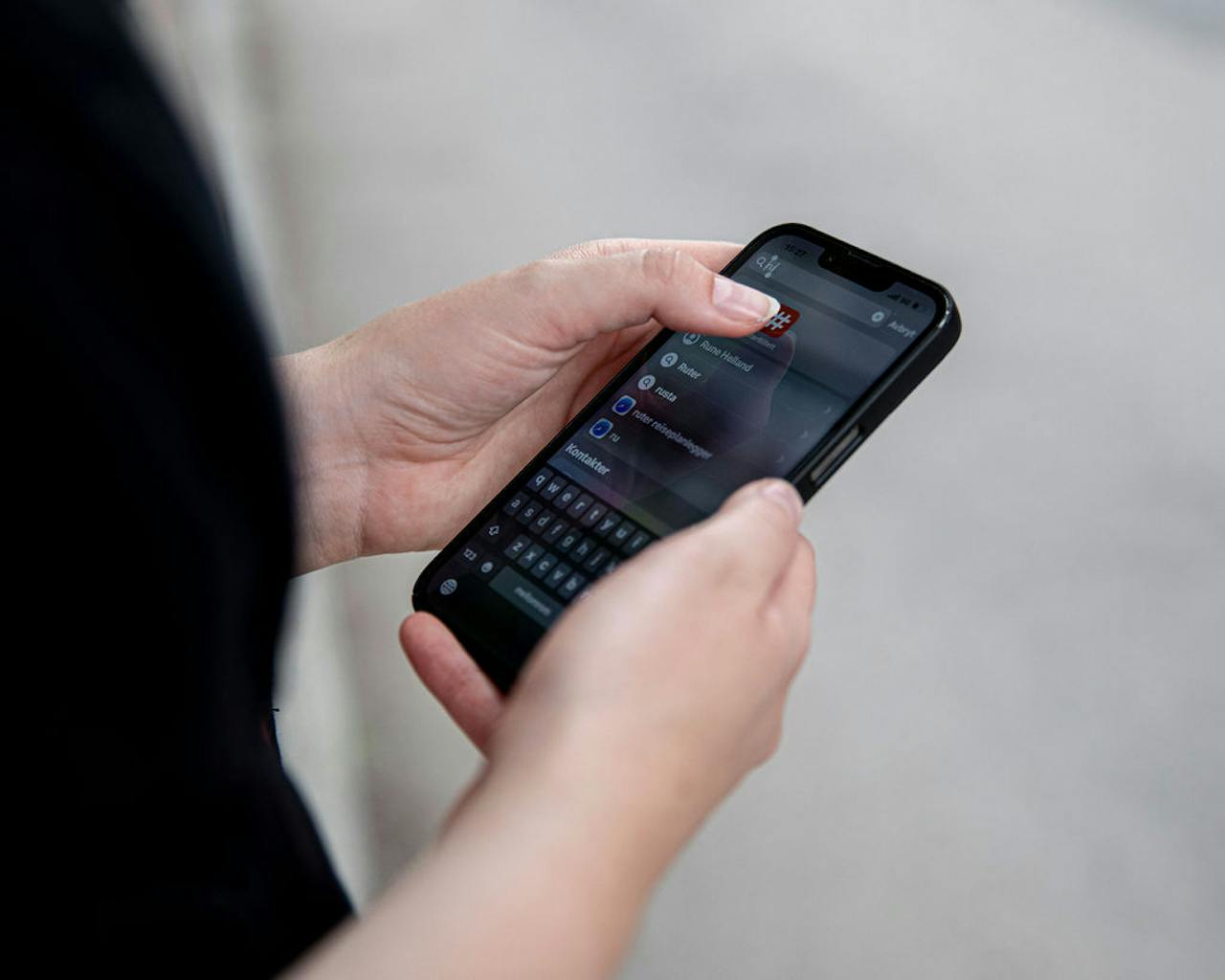
eSIM er et innebygget, elektronisk SIM-kort. eSIM fungerer på samme måte som et vanlig fysisk SIM-kort, men er digitalt og installeres direkte på mobilen. Det er både raskt og enkelt, mer miljøvennlig og ikke minst frigjør plass på mobilen.
Hvorfor velge eSIM?

Digitalt - ingen ventetid
Du slipper å vente på at det sendes med posten.

Miljøvennlig
Ingen produksjon av plast, ingen logistikk.

Trygt
Fordi eSIM ikke kan fjernes fra mobilen, minimerer det sjansen for at noen misbruker SIM-kortet ditt.
Hvordan komme i gang med eSIM?
- Du må være koblet til WiFi for å kunne installere eSIM.
- Du må ha BankID-appen for at vi skal vite hvem du er.
- Dersom du skal aktivere eSIM på mobilen til et barn og har Foreldrekontrollen på, så bør den skrus av midlertidig da den kan blokkere for aktiveringen.
Videoguide til iPhone
Videoguide til Samsung
Har du nylig aktivert et nytt eSIM?
- Vær oppmerksom på at det kan ta opptil 10 minutter før ditt nye eSIM er aktivert. Et lite tips: Start telefonen på nytt for å sikre at eSIM kobles til mobilnettet.
- Når eSIM-et er oppe og går, kan du ta ut ditt gamle fysiske SIM-kort og kaste det. Har du eSIM fra før anbefaler vi at du sletter det gamle fra SIM-kort menyen på telefonen din.
- Har du flere SIM? Ditt nye eSIM må være installert som hovednummer for at ditt abonnement skal fungere. Slik finner du SIM-innstillinger på mobilen din:
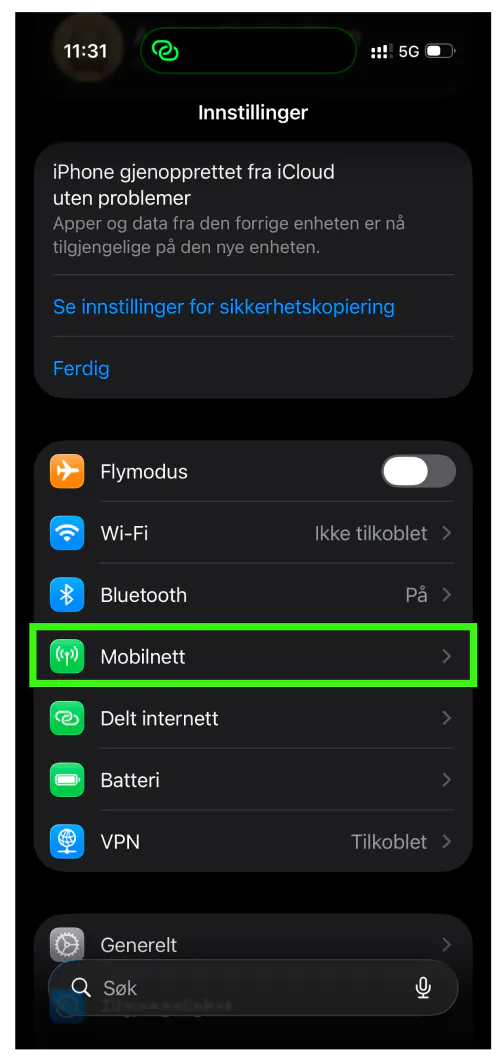
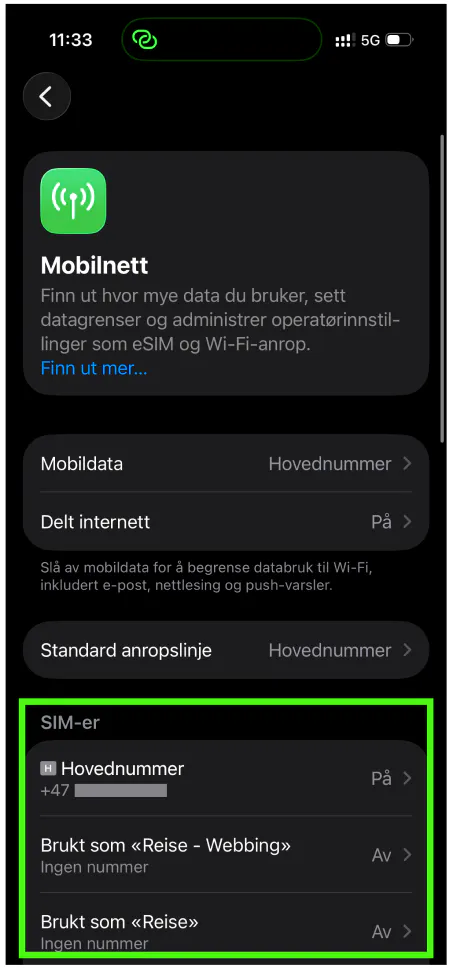
SIM-innstillinger på iPhone
1. Åpne Innstillinger og velg Mobilnett
2. Her finner du oversikt over alle dine SIM-kort
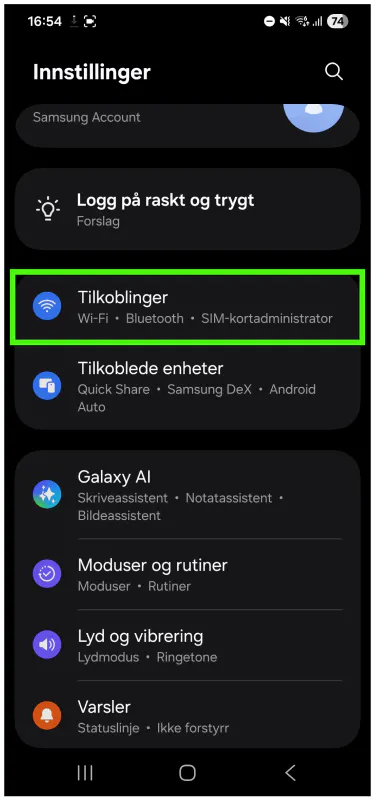
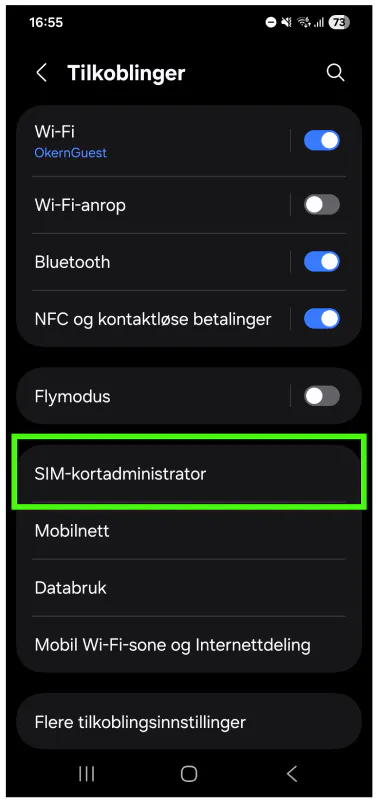
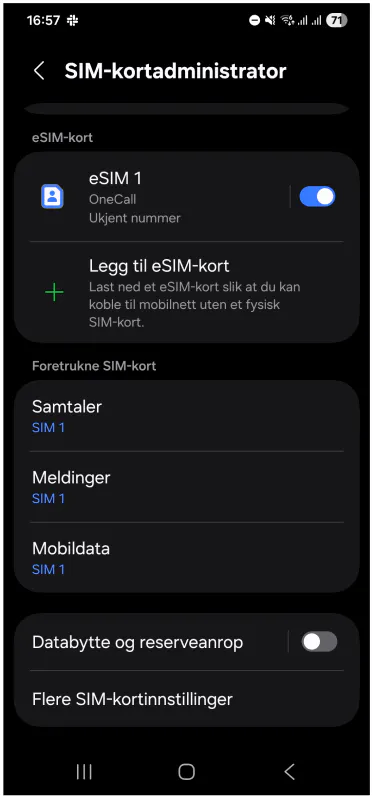
SIM-innstillinger på Samsung
1. Åpne Innstillinger og velg Tilkoblinger
2. Velg SIM-kortadministrator
3. Her finner du oversikt over alle dine SIM-kort
Vanlige spørsmål om eSIM
De fleste mobiltelefoner etter 2018 støtter eSIM, i tillegg til mange nettbrett og smartklokker. Dette gjelder blant annet iPhone 11 og nyere, og Samsung Galaxy S20 og nyere. Du kan selv sjekke om mobilen din støtter eSIM ved å taste inn *#06# og trykk på ringe-knappen. Hvis den gjør det, vil du se en linje som heter eID på mobilskjermen. Du kan også se om telefonen din er i listen under.
Alle OneCall-kunder med mobiltelefoner som støtter eSIM, kan bytte sitt hoved SIM-kort fra et fysisk SIM-kort til et eSIM. Det kan du gjøre i OneCall-appen.
Hvis du ønsker eSIM, men ikke er OneCall-kunde enda, kan du velge eSIM som alternativ når du bestiller abonnement hos oss.
PIN-kode er slått av som standard, men du kan sette den på manuelt inne på innstillinger på mobilen din om du ønsker det.
Når ditt nye eSIM er oppe og går, kan du ta ut ditt gamle fysiske SIM-kort og kaste det. Har du eSIM fra før anbefaler vi at du sletter det gamle fra SIM-innstillinger på mobilen din.
Hvilke mobiler støtter eSIM?
- Apple iPhone SE (2020)
- Apple iPhone SE (2022)
- Apple iPhone XR
- Apple iPhone XS
- Apple iPhone XS Max
- Apple iPhone 11
- Apple iPhone 11 Pro
- Apple iPhone 11 Pro Max
- Apple iPhone 12
- Apple iPhone 12 Mini
- Apple iPhone 12 Pro
- Apple iPhone 12 Pro Max
- Apple iPhone 13
- Apple iPhone 13 Mini
- Apple iPhone 13 Pro
- Apple iPhone 13 Pro Max
- Apple iPhone 14
- Apple iPhone 14 Plus
- Apple iPhone 14 Pro
- Apple iPhone 14 Pro Max
- Apple iPhone 15
- Apple iPhone 15 Plus
- Apple iPhone 15 Pro
- Apple iPhone 15 Pro Max
- Apple iPhone 16
- Apple iPhone 16 Plus
- Apple iPhone 16 Pro
- Apple iPhone16 Pro Max
- Apple iPhone 16e
- Apple iPhone 17
- Apple iPhone 17 Pro
- Apple iPhone 17 Pro Max
- Apple iPhone 17e
- Apple iPhone Air
- Samsung Galaxy A54 5G
- Samsung Galaxy Note20
- Samsung Galaxy Note20 Ultra
- Samsung Galaxy S20
- Samsung Galaxy S20 Ultra
- Samsung Galaxy S20+
- Samsung Galaxy S21
- Samsung Galaxy S21 Ultra
- Samsung Galaxy S21+
- Samsung Galaxy S22
- Samsung Galaxy S22 Ultra
- Samsung Galaxy S22+
- Samsung Galaxy S23
- Samsung Galaxy S23 Ultra
- Samsung Galaxy S23+
- Samsung Galaxy S24
- Samsung Galaxy S24 FE
- Samsung Galaxy S24 Ultra
- Samsung Galaxy S24+
- Samsung Galaxy S25
- Samsung Galaxy S25 Edge
- Samsung Galaxy S25 FE
- Samsung Galaxy S25 Ultra
- Samsung Galaxy S25+
- Samsung Galaxy S26
- Samsung Galaxy S26 Ultra
- Samsung Galaxy S26+
- Samsung Galaxy Z Flip
- Samsung Galaxy Z Flip 3
- Samsung Galaxy Z Flip 4
- Samsung Galaxy Z Flip 5
- Samsung Galaxy Z Flip 6
- Samsung Galaxy Z Flip 7
- Samsung Galaxy Z Flip 7 FE
- Samsung Galaxy Z Fold
- Samsung Galaxy Z Fold 2
- Samsung Galaxy Z Fold 3
- Samsung Galaxy Z Fold 4
- Samsung Galaxy Z Fold 5
- Samsung Galaxy Z Fold 6
- Samsung Galaxy Z Fold 7
- Samsung Galaxy Z TriFold
- Google Pixel 3A
- Google Pixel 3A XL
- Google Pixel 4
- Google Pixel 4 XL
- Google Pixel 4A
- Google Pixel 5
- Google Pixel 5A
- Google Pixel 6
- Google Pixel 6 Pro
- Google Pixel 6A
- Google Pixel 7
- Google Pixel 7 Pro
- Google Pixel 7a
- Google Pixel 8
- Google Pixel 8 Pro
- Google Pixel 8A
- Google Pixel 9
- Google Pixel 9 Pro
- Google Pixel 9 Pro Fold
- Google Pixel 9 Pro XL
- Google Pixel 9A
- Google Pixel 10
- Google Pixel 10 Pro
- Google Pixel 10 Pro Fold
- Google Pixel 10 Pro XL
- Google Pixel 10a
- Google Pixel Fold
- Sony Xperia 1 IV
- Sony Xperia 1 V
- Sony Xperia 1 VI
- Sony Xperia 1 VII
- Sony Xperia 5 IV
- Sony Xperia 5 V
- Sony Xperia 10 III
- Sony Xperia 10 IV
- Sony Xperia 10 V
- Sony Xperia 10 VI
- Sony Xperia 10 VII
- Sony Xperia Ace III
- Xiaomi 12T Pro
- Xiaomi 13
- Xiaomi 13 Lite
- Xiaomi 13 Pro
- Xiaomi 13T
- Xiaomi 13T Pro
- Xiaomi 14
- Xiaomi 14 Pro
- Xiaomi 14T
- Xiaomi 14T Pro
- Xiaomi 15
- Xiaomi 15 Ultra
- Xiaomi 15T
- Xiaomi 15T Pro
- Xiaomi 17
- Xiaomi 17 Ultra
- Xiaomi Leica Leitzphone
- Xiaomi Mi Watch
- Xiaomi Poco F8 Pro
- Xiaomi Poco X7
- Xiaomi POCO X8 Pro Max
- Xiaomi Redmi Note 13 Pro 5G
- Xiaomi Redmi Note 13 Pro+ 5G
- Xiaomi Redmi Note 14 Pro 5G
- Xiaomi Redmi Note 14 Pro+ 5G
- Xiaomi Redmi Note 15 Pro 5G
- Xiaomi Redmi Note 15 Pro+ 5G
- Motorola RAZR 2022
- Motorola RAZR 5G
- Motorola Edge 40
- Motorola Edge 40 Neo
- Motorola Edge 40 Pro
- Motorola Moto G53 5G
- Motorola Moto G54 5G
- Motorola Moto G84 5G
- Motorola RAZR (2019)
- Motorola razr 40
- Motorola razr 40 ultra
- Nokia X30 5G
- Nokia G60 5G
- Nokia/HMD XR21
- Huawei P40
- Huawei P40 Pro
- Huawei Mate40 Pro
- Huawei Mate40
- Huawei Pura 80 Ultra
- Microsoft Surface
- Microsoft Surface Duo
- Microsoft Surface Duo 2
- Microsoft Surface Go LTE 2
- Microsoft Surface Pro 7+
- Microsoft Surface Pro 8 LTE
- Microsoft Surface Pro LTE (5th Gen)
- Microsoft Surface Pro X
- OnePlus 11
- OnePlus 12
- OnePlus 13
- OnePlus 13R
- OnePlus 15
- OnePlus 15R
- OnePlus Open
Det kan være flere mobiltelefoner som støtter eSIM, se manualen til din telefon.
Kan jeg bruke Apple Watch, Samsung Galaxy Watch eller Google Pixel med OneCall?
Selvfølgelig kan du det! Har du en klokke som støtter eSIM, kan du sette opp et ekstra eSIM på klokken sånn at den alltid er koblet til internett, selv om du har mobilen et annet sted. Oppsettet gjør du på telefonen din. Det kan være at du må logge inn på onecall.no under denne prosessen. Se pris for tjenesten Ekstra-SIM her.
Under kan du finne guider til hvordan du setter opp din klokke:
Hvilke klokker støtter eSIM?
- Apple Watch S3
- Apple Watch S4
- Apple Watch S5
- Apple Watch S6
- Apple Watch S7
- Apple Watch S8
- Apple Watch S9
- Apple Watch 10
- Apple Watch 11
- Apple Watch SE (2020)
- Apple Watch SE (2022)
- Apple Watch SE 3
- Apple Watch Ultra
- Apple Watch Ultra 2
- Google Pixel Watch
- Google Pixel Watch 2
- Google Pixel Watch 3
- Google Pixel Watch 4
- Samsung Galaxy Watch
- Samsung Galaxy Watch 3
- Samsung Galaxy Watch 4
- Samsung Galaxy Watch 4 Classic
- Samsung Galaxy Watch 5
- Samsung Galaxy Watch 5 Pro
- Samsung Galaxy Watch 6
- Samsung Galaxy Watch 6 Classic
- Samsung Galaxy Watch Active 2
- Samsung Galaxy Watch 7
- Samsung Galaxy Watch 7 Ultra
- Samsung Galaxy Watch 8
- Samsung Galaxy Watch 8 Classic
- Samsung Galaxy Watch Active 2
- Xplora X5 Play eSIM
- Xplora X6 Play eSIM
- Xplora X6 Pro eSIM
- Oppo Watch 3
- Xiaomi Mi Watch
- Mobvoi TicWatch Pro 3 LTE
- Mobvoi TicWatch Pro LTE
- Huawei Watch 2
- Huawei Watch 3
- Huawei Watch 3 Pro
- Huawei Watch 4
- Huawei Watch 4 Pro
- Huawei Watch 5